Post by: MrsFlynn on July 28, 2021, 08:05:56 PM
*Update: As of end of January 2026, the Smooth Patch is no longer being supported by Lazy Duchess.
I've decided to leave the notes, as they maybe helpful for others still using this mod. :)
====
Wanted to share something MrsGoodWrench and I found.
S3 - Smooth Patch by Lazy Duchess (MTS)
https://modthesims.info/d/658759/smooth-patch.html
S3 - Smooth Patch 1.2 by Lazy Duchess (Tumblr)
https://lazyduchess.tumblr.com/post/668615848676769792/the-sims-3-smooth-patch-12
The mod helps speed up loading of the game itself, Live mode, Build/Buy modes, CAS and CASt (Create a Style)
Review (and Show and Tell) of the Smooth Patch 1.0 by Lazy Duchess
https://www.youtube.com/watch?v=61qQ6ko0-Vo
–- You can find my review here (https://jadekitten.net/mfhot/index.php?topic=260.msg2482#msg2482) of v.1.x
Notes on the Smooth Patch:
I've been seeing reports of the Smooth Patch not working or downloading, for some players. I wanted to share some notes that may be able to help with that.
I wanted to first note the patch may get false-flagged as a virus. It is not a virus or malware. As stated by the creator in the description of the mod at MTS, under the Troubleshooting section. If you run into this issue, you may need to allow your antivirus program to download the program or tell the antivirus it's okay to have on your computer.
✽✽ It's my understanding that if you use any Nraas Mods, specifically MasterController, MC Cheats, and MC Integration - Do not add the package files (ld_SmoothPatch.package ; ld_SmoothPatch_MasterController.package) to your mods folder. They may cause the game to become unstable and is known to be not compatible with Nraas mods, according to those at Nraas.
––- Please understand that Nraas may not help troubleshoot issues with the Smooth Patch, due to conflicts with their own mod suite. Read more about it here (https://www.nraas.net/community/post93740#p93740).
▪︎ Knight over at Nraas kindly uploaded the older versions of the Smooth Patch in one archive, going back to the original patch.
Where's the older version of SmoothPatch?:
https://nraas.net/community/post95139#p95139
** Thank you Knight!! **
----
~ There are two versions and an old 1.0 version:
–- Click the download button to the right of the patch file, or click the direct download link below for the file you need . - Saving to Desktop is recommended.
Download and extract with 7zip: https://www.7-zip.org/a/7z1900-x64.exe
- Right-click on zipped folder and extract to (name of folder)
ld_TS3PatchEA.zip (Origin/EA App version) -- Updated: Jan. 2024
Direct Download Link: https://chii.modthesims.info/getfile.php?file=2125462&v=1706733367
ld_TS3Patch10.zip (Steam/Disc version) -- Updated: Jan. 2024
Direct Download Link: https://chii.modthesims.info/getfile.php?file=2124160&v=1706733391
Or uninstall the current version and install the older 1.0 version.
Smooth Patch v1.21 (Steam/Disc) (https://jadekitten.net/mfhot/index.php?action=dlattach;topic=260.0;attach=187) - Released July.2021
Origin/EA-App - Smooth Patch v1.21 (https://jadekitten.net/mfhot/index.php?action=dlattach;topic=260.0;attach=188) - Released Feb.2022
–- Posting an older version in case there are others who are having problems with the newer version and want to try the older version. I renamed the older v1.21 files linked above so you can better tell them apart. lol
----
~ Installation of Patch:
✦ The install path may be different depending on where the game is installed.
– For the EA App: the zip file (ld_TS3PatchEA.zip) provides these files: TS3Patch.asi; TS3Patch.txt ; TS3PatchLauncher.exe ; TS3PatchLauncher.cfg and a Package folder with ld_SmoothPatch.package ; ld_SmoothPatch_MasterController.package
Copy and paste these files: TS3Patch.asi; TS3Patch.txt ; TS3PatchLauncher.exe into:
[C:\Program Files\EA Games\The Sims 3\Game\Bin]
If you use Origin, open the "TS3PatchLauncher.cfg" file with a text editor and replace the "PlatformName = EADesktop.exe" line with "PlatformName = Origin.exe", then save the file.
You will need to run the game from "TS3PatchLauncher.exe" every time for the mod to kick in.
– If still Rockin' Origin, I'm not sure exactly what to do other than it seems to have similar instructions, however the files get copied to:
[C:\Program Files (x86)\Origin Games\The Sims 3\Game\Bin]
– For Steam/Disc: the zipped file (ld_TS3Patch10.zip) provides these files: ddraw.dll ; TS3Patch.asi; TS3Patch.txt - Copy and paste these files into:
Disc: C:\Program Files (x86)\Electronic Arts\The Sims 3\Game\Bin
Steam: C:\Program Files (x86)\Steam\steamapps\common\The Sims 3\Game\Bin
Nindigo share's how to launch it via Origin here (https://jadekitten.net/mfhot/index.php?topic=260.msg2484#msg2484).
Launch the game as you normally would -- If you have the Steam/Disc version.
----
~ To Make Sure It's Working Correctly:
If you want to make sure it's working correctly, change the Debug option to 1 in the TS3Patch.txt file located in C:\Program Files\Electronic Arts\The Sims 3\Game\Bin. It will give you a popup message after you start the game.
You would look for this option:
# If this is 1, show a message on startup to make sure the mod is working.
Debug = 0
----
~ Uninstall the Patch:
I am not sure about the Origin/EA App version of the patch. The steps to uninstall maybe fairly similar to the Disc/Steam uninstall process. I've got the original 2009 Disc version of Sims 3.
As a test, I copied/pasted - ddraw.dll ; TS3Patch.asi; TS3Patch.txt into a temporary folder on my desktop and deleted the originals from [C:\Program Files (x86)\Electronic Arts\The Sims 3\Game\Bin].
Loaded my game. It loaded just fine and so did Create A style, Build and Buy mode, so I'd call that a successful uninstall of the patch.
You might consider keeping a backup copy of these files, just in case you want to use them later.
With the test I was able to do, my theory is those using the Origin/EA App version of the game should be able to successfully uninstall the patch.
1. Copy/paste - TS3Patch.asi; TS3Patch.txt ; TS3PatchLauncher.exe ; TS3PatchLauncher.cfg into a temporary folder on your desktop. You can also copy over the Packages folder if you used it that have the files - ld_SmoothPatch.package and ld_SmoothPatch_MasterController.package in it. Just so all the files are kept together.
2. Delete the original from [C:\Program Files\EA Games\The Sims 3\Game\Bin].
3. Load your game to make sure Sunset Valley still loads fine, and Build/Buy Mode and Create a Style loads okay as well. Maybe a little slower to load, but it should still load.
Hopefully the uninstall went well. If it didn't, add back the files to where you deleted them from and re-test.
----
~ Smooth Patch - Differences Between the Versions:
I saw a question asking about the Smooth Patch and the difference between v.1.21 and v2. I'm using the EA App version of Smooth Patch for my difference example and explain the differences as I understand them.
The basics of the mod is the same. The TPS ; FPS Limiter ; Borderless and Debug parts are all the same. As you can see by the screenshots below.
––v1.21 version dated Dec. 2021 and Feb.2022
Files:

S3Patch.txt:

----
––v.2.x dated Oct.2022
Files:

S3Patch.txt:

Where the difference seems to be is that v.2 added a couple of .package files inside a Package folder that shouldn't be added if using Nraas Mods from what I understand and TS3PatchLauncher.cfg file.
v.2x is also known to be not as stable and can cause a lot of issues with the game and your computer. It is highly recommended to use the older 1.x version as it seems to be more stable.
Post by: Nindigo on July 28, 2021, 10:04:59 PM
Post by: Lapaige46 on July 29, 2021, 11:49:54 AM
Post by: MrsFlynn on July 29, 2021, 11:59:55 AM
Default path to the installation folder for disc version is:
C:\Program Files (x86)\Electronic Arts\The Sims 3\Game\Bin
There maybe a special way to launch the game since you use Steam. I don't want to share what my path is to launch the game for fear it might be confusing.
Post by: Nindigo on July 29, 2021, 12:22:13 PM
For Steam installations, it also goes into the Bin (not the Bin/bin) folder. Launch as normal.
Post by: Lapaige46 on July 29, 2021, 12:43:18 PM
Program Files (x86)\Steam\Steamapps\Common\The Sims 3\Game\Bin\Bin\ - the patch is there but it's only a file folder. There's no launch. In the first Bin there are several launch buttons but none are the patch.
(https://i.ibb.co/mSkPVhP/Smooth-Patch.jpg) (https://ibb.co/mSkPVhP)
Post by: MrsFlynn on July 29, 2021, 12:58:14 PM
I am testing out the mod myself and just launched the game as I normally do. It's too early to tell if it's really helping or not.
Post by: Lapaige46 on July 29, 2021, 01:00:17 PM
Post by: MrsFlynn on July 29, 2021, 01:34:32 PM
C:\Games\Electronic Arts\The Sims 3\Game\Bin
I unzipped the folder and copied the contents ddraw.dll ; TS3Patch.asi and TS3Patch.txt into the folder mentioned above.
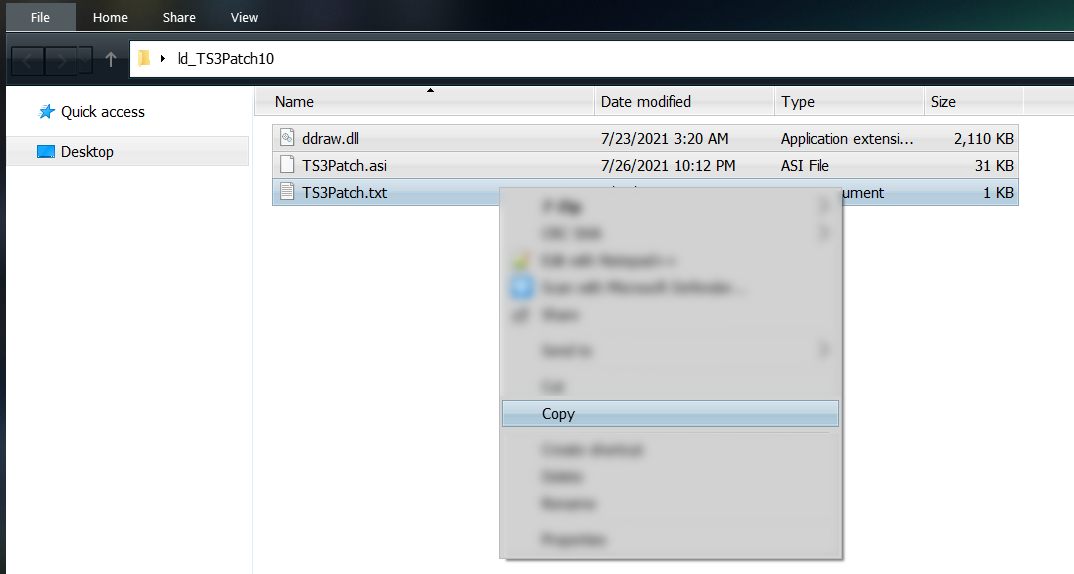
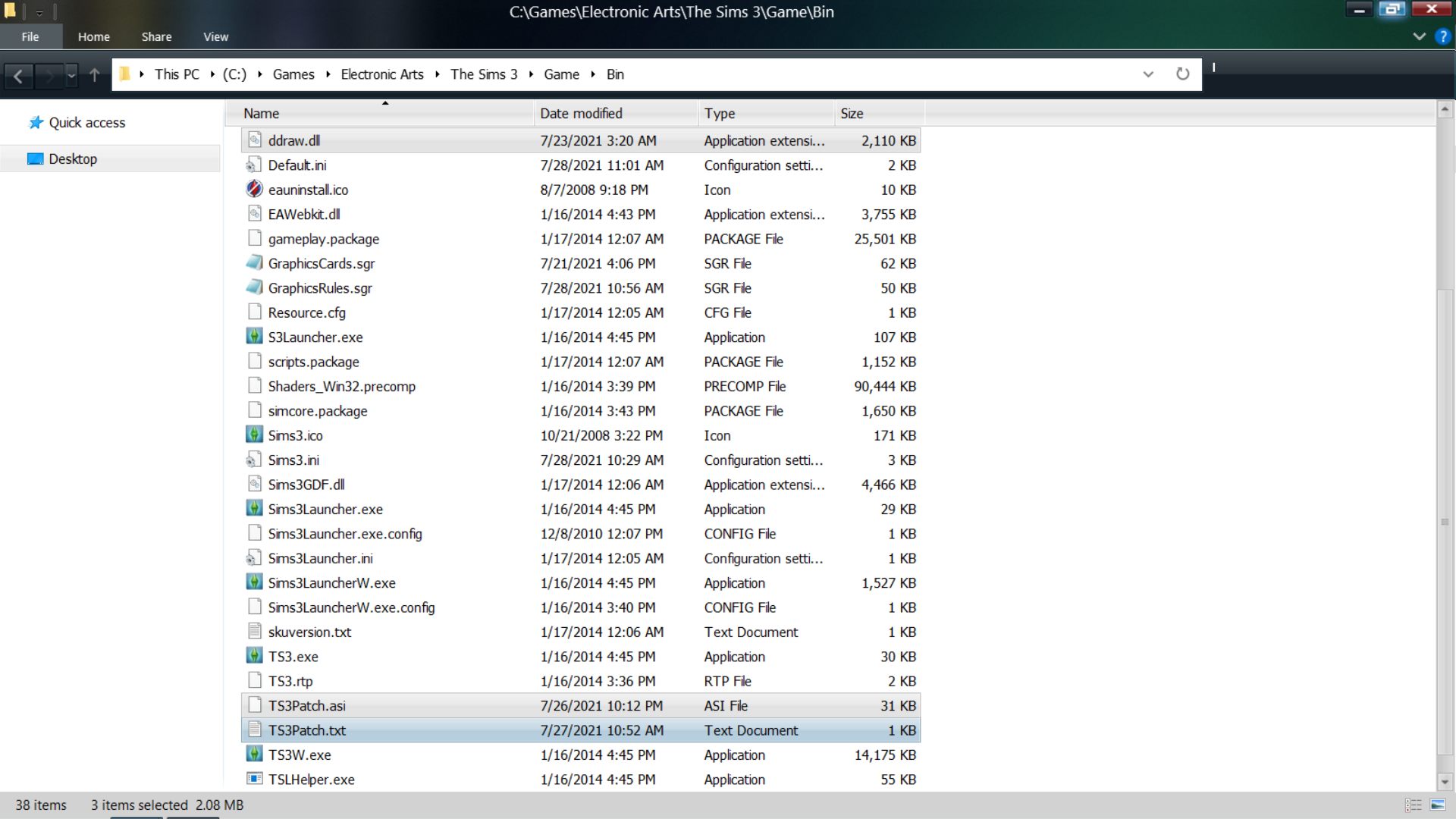
Since I have the disc version I launched the game like I normally do - click the Sims 3 shortcut on my desktop.
("C:\Games\Electronic Arts\The Sims 3\Game\Bin\TS3W.exe")
I'm definitely noticing quicker loading and exiting times. Cut by half or more. Same for loading a save file. I am really impressed with the quicker loading of Build/Buy, CAS and Create a Style.
It may make the computer run slightly warmer than it would without the patch. This seems to be expected.
✽ Running the smooth patch since end of July with most packs enabled (No Uni or ITF), plus 300 MB of mods and custom content installed is going well. Nice speed boost and still impressed with the quicker loading times of Build/Buy and CAS. It's like buttah!! lol
----
Helpful Link:
The first post on the thread linked below has some really good information on this mod.
The Sims 3 Smooth Patch
https://www.nraas.net/community/chatterbox/topic10091
Post by: Nindigo on July 29, 2021, 01:47:16 PM
I corrected my previous reply to you: For Steam users, the smooth patch must be unzipped into the Game/Bin folder (not the Bin/bin one) and you just launch as normal from there. The new launcher. exe is just for us Origin users.
*sends 50.000 dark side cookies to Canada*
Post by: Nindigo on July 29, 2021, 02:04:17 PM
Origin version
I place these unzipped files in C:\Program Files (x86)\Origin Games\The Sims 3\Game\Bin:
TS3Patch.asi
TS3Patch.txt
TS3PatchLauncher.exe
I have added the exe to my task bar, as this must be used to run the game if the patch is to be active.
The biggest difference I spot is in the UI (user interface) - it looks and feels a lot, well...smoother and responds quicker.
My tower PC doesn't seem to run any warmer than usual. It can run more than one game at a time. Not that I ever need that though ::)
Post by: Lapaige46 on July 29, 2021, 02:51:38 PM
I decided that since I didn't seem to be able to have a nap, I had a wake-me-up shower instead and now I'm messing around with my Mill lot.
Post by: MrsFlynn on August 08, 2021, 06:57:46 AM
See 1st post for links.
Post by: Nindigo on August 08, 2021, 11:23:14 AM
Post by: Nindigo on August 09, 2021, 01:47:16 PM
My launcher doesn't register whenever I click a download button there, be it the smooth patch launcher or the regular one :-\
Post by: MrsFlynn on August 09, 2021, 01:53:28 PM
I've got all my store content backed up on an external hard drive and grab files from it if needing anything.
I don't know if it would make a difference, but I suppose I could test it?
Derp question, with the launcher not working correctly, have you tried the Downloads Dashboard?
Downloads Dashboard
https://www.carls-sims-4-guide.com/forum/index.php?topic=16094.msg307126#msg307126
Post by: Nindigo on August 09, 2021, 01:59:29 PM
Post by: Lapaige46 on August 09, 2021, 02:00:50 PM
Post by: MrsFlynn on August 09, 2021, 02:13:38 PM
Yes, the launcher has always been problematic. So I don't think it's just because of the Smooth Patch.
No, as it means I must login. But I can give it a try, I guess. I don't think there was a problem before the smooth patch.
Post by: MrsFlynn on August 09, 2021, 02:34:43 PM
This should ?? work regardless if you using a new Sims 3 folder or not.
I did so it wouldn't mess with anything in my main Sims 3 folder. I use a new Sims 3 folder no matter if I'm downloading something from the store or the exchange.
Post by: Lapaige46 on August 09, 2021, 02:39:27 PM
This may not be the same issue though.
Post by: MrsFlynn on August 09, 2021, 02:44:10 PM
I was just having a similar problem in a way. But then went to my purchase history page and downloaded a couple of sets from there and it went fine.
I'm happy to hear your game is behaving though :)
Post by: Lapaige46 on August 09, 2021, 04:45:11 PM
Post by: Nindigo on August 09, 2021, 09:42:57 PM
Update: Removing the smooth patch and creating a new The Sims 3 folder did the trick.
Post by: MrsFlynn on August 10, 2021, 06:34:19 AM
Smooth Patch
https://modthesims.info/download.php?t=658759&c=1&goto=newpost
Post by: Nindigo on August 10, 2021, 06:47:13 AM
Post by: MrsFlynn on August 10, 2021, 06:56:51 AM
Post by: Lapaige46 on August 10, 2021, 07:48:00 AM
Post by: Nindigo on August 18, 2021, 10:06:27 AM
The issue with store downloads that didn't seem to work resolved itself after I cleaned up my game folder a bit and re-installed the smooth patch.
I'm a happy camper now :)
Post by: MrsFlynn on August 18, 2021, 10:12:04 AM
Post by: MrsFlynn on November 27, 2021, 09:10:05 PM
Tumblr Page: https://lazyduchess.tumblr.com/post/657467259898527744
Looks like it's mostly improvements to the FPS limiter and works better with Origin.
More Notes on the Smooth Patch Here (https://jadekitten.net/mfhot/index.php?topic=260.msg2465#msg2465)
Post by: Nindigo on December 22, 2021, 12:38:17 AM
Post by: MrsFlynn on February 19, 2022, 10:42:07 PM
Smooth Patch 1.2.1 -- Updated 15th Feb 2022
-- Links back to newer broken version.
Update 1.2.1:
- Optimized FPS Limiter.
- General Optimization.
- Borderless should now work better, even if you change resolutions in-game.
See this post (https://jadekitten.net/mfhot/index.php?topic=260.msg2465#msg2465) for notes on patch and help with install.
Post by: Nindigo on February 19, 2022, 11:48:49 PM
Post by: Nindigo on July 25, 2022, 06:06:27 AM
I will note, though, that you can't always just click on the tab for next outfit type. You will have til close the current outfit window. I'm sure Lazy Duchess is aware of the issue since it's an obvious one.
TS3 Smooth Patch 2.0 - BETA
https://lazyduchess.tumblr.com/post/689080037599772672/ts3-smooth-patch-20-beta (https://lazyduchess.tumblr.com/post/689080037599772672/ts3-smooth-patch-20-beta)
Post by: Lapaige46 on December 04, 2022, 12:54:22 PM
https://modthesims.info/d/658759/smooth-patch-2-1.html
But I've just been reading the comments and it doesn't appear to be working properly. It may be due to operator error but I'm not going to install it just yet.
Post by: MrsFlynn on December 04, 2022, 04:20:46 PM
I did want to add, looking through comments on MTS, someone shared a copy of the v1.0 Smooth Patch for Origin.
https://chii.modthesims.info/getfile.php?file=2129761
Post by: Lapaige46 on December 04, 2022, 04:24:00 PM
Post by: MrsFlynn on December 04, 2022, 04:35:20 PM
https://www.nraas.net/community/MasterController
MC Cheats; MC Expanded Tattoo; MC Integration; and MC Progression
I have both Cheats and Integration installed. Cheats I think ? expands on what the main MasterController offers. And Integration replaces CAS interactions and includes a CAS button while in Edit Town Mode.
Not sure what the others do.
Post by: Lapaige46 on December 04, 2022, 04:57:55 PM
Post by: MrsFlynn on April 09, 2023, 03:37:19 PM
I've read it's suggested if you use Nraas MasterController, Cheats and Integration to leave the package files out, so it doesn't conflict with the Nraas mods or cause problems with your game.
I was working with version 1.-something until I uninstalled it today. I was thinking of leaving it uninstalled for a little while to see if I notice any differences.