Post by: Lapaige46 on January 03, 2021, 03:10:21 PM
My Saltwood house is in a saved game but if I go to the main menu, Riverview is no longer in the new game dropdown. It doesn't matter because I can still access it through my save, but I thought it was strange that it's just gone.
Post by: MrsFlynn on January 03, 2021, 03:23:45 PM
If this is the case, look in your Saves folder to see what saves are listed:
\Documents\Electronic Arts\The Sims 3\Saves
Do you see your Riverview Save in there? If not, did you may be move it somewhere?
You may need to check OneDrive, as sometimes things get moved to it. If your Riverview Save is found there, you can safely move it back.
Then turn off OneDrive to prevent this from happening again, as Sims 3 cannot see anything outside the \Documents\Electronic Arts\The Sims 3 folder.
Turn off, disable, or uninstall OneDrive
https://support.microsoft.com/en-us/office/turn-off-disable-or-uninstall-onedrive-f32a17ce-3336-40fe-9c38-6efb09f944b0
Post by: MrsFlynn on January 03, 2021, 03:28:18 PM
Hmm... let me take some troubleshooting notes.
That may mean it was uninstalled somehow.
Have you checked your Downloads folder to see if Riverview is in there?
\Documents\Electronic Arts\The Sims 3\Downloads
If yes, check the launcher to see if it's in the Installed tab? Is it there?

If no, it may need to be reinstalled.
If you have Riverview in your Downloads folder, double-click the file and it should automatically start installing.
Post by: Lapaige46 on January 03, 2021, 03:32:03 PM
Post by: Lapaige46 on January 03, 2021, 03:33:06 PM
Ooooh Wait... Clue word... Riverview isn't in the dropdown menu....
Hmm... let me take some troubleshooting notes.
You got it.
Post by: MrsFlynn on January 03, 2021, 03:47:44 PM
Post by: MrsFlynn on January 03, 2021, 03:54:14 PM
I think I may have answered this, so please forgive the repeat. :)
Yes, you can delete your "build" save file as long as your house file has been saved to your library. The house can be found in the Show Empty Houses tab and can be placed in any save you choose.
Post by: Lapaige46 on January 03, 2021, 03:59:19 PM
Post by: Lapaige46 on January 03, 2021, 03:59:37 PM
There are 2 files in my World Caches folder - Riverview Sims pkg and Riverview objects pkg.
There are also some files from my various saves. I just can't start a new game unless I go back and d/l it again.
Post by: MrsFlynn on January 03, 2021, 04:08:52 PM
We downloaded all our purchased Sims 3 store content a few years back and have been super thankful for that. As then I just grab a copy of the file from our external hard drive and reinstall it.
Post by: Lapaige46 on January 03, 2021, 04:13:53 PM
Post by: MrsFlynn on January 03, 2021, 04:25:05 PM
Ah!! I wonder if it's because you've got parts of it still installed (World Caches folder - Riverview Sims pkg and Riverview objects pkg), but not the world file itself. That actually makes sense. That's how you're able to use your save files, but not start a new Riverview save.
I've actually wondered about that. lol
Post by: Lapaige46 on January 03, 2021, 04:33:48 PM
I have some Three Pines saves showing in my saves folder but I'm not able to access them.
I'm going to try and d/l a new Riverview and see if that lets me access the other saves. The biggest problem I have right now is remembering my password for the store. Duh....
I just downloaded it again and now it's showing up 3 times. :D Oh well. I guess a couple of spares won't hurt.
Post by: MrsFlynn on January 03, 2021, 04:40:56 PM

Post by: MrsFlynn on January 03, 2021, 04:43:39 PM
I just downloaded it again and now it's showing up 3 times. :D Oh well. I guess a couple of spares won't hurt.
Post by: Lapaige46 on January 03, 2021, 04:45:53 PM
Post by: MrsFlynn on January 03, 2021, 04:50:09 PM
I know. I was just joking about keeping the spare. :D I'm tired already. Too pooped to play. :o
Post by: Lapaige46 on January 03, 2021, 04:52:22 PM
Post by: MrsFlynn on January 03, 2021, 04:54:51 PM
Post by: Lapaige46 on January 03, 2021, 04:55:54 PM
Post by: Sonshine on January 10, 2021, 04:30:14 PM
Post by: Lapaige46 on January 10, 2021, 04:37:42 PM
Lapaige, have you thought about having all of your pw's written in a small notebook? That's what I do. I have to! Many years ago, I used to use the same pw for everything and eventually got hacked. So now I have a different pw for just about everything so I need to write them down. Otherwise, I would never remember them. : /
Passwords are a real pain. I have several business ones that have to be changed every three months. I keep them in a folder on my phone because I always (almost) have my phone with me. I have them coded but I have them so well coded that I often can't remember what the code is. :D I have to have a notebook for my codes I guess.
Post by: MrsFlynn on May 15, 2021, 07:27:33 PM
Riverview not in drop menu despite having it installed
https://www.reddit.com/r/Sims3/comments/n4flmk
I installed a world from the Sims 3 Store but it’s not in game.
https://nonasims.wordpress.com/tag/install-world/
Store and Custom Content uninstalls itself
https://sims3.crinrict.com/en/2011/09/bug-store-and-custom-content-uninstalls-itself.html
Why did all of my store content suddenly uninstall?
https://forums.thesims.com/en_us/discussion/951888/why-did-all-of-my-store-content-suddenly-uninstall
Wanted to share these tips just in case they can be of help. :)
Post by: Lapaige46 on May 15, 2021, 07:30:06 PM
Post by: Lapaige46 on May 16, 2021, 12:46:49 PM
Post by: MrsFlynn on May 16, 2021, 03:34:24 PM
Though it sounds like you're able to install it just fine, as before. It's getting it to actually stay installed in the game that seems to be the issue?
Post by: Lapaige46 on May 16, 2021, 05:09:46 PM
Post by: MrsFlynn on May 16, 2021, 05:53:47 PM
I just enlarged Ashley's (green) house. I think I'd better save it in case I lose everything again. :D
Post by: Lapaige46 on May 16, 2021, 05:56:01 PM
Post by: Lapaige46 on May 17, 2021, 12:28:23 PM
Post by: MrsFlynn on May 17, 2021, 04:09:51 PM
Well, guess what. Riverview disappeared again. I had to go back into the Downloads Dashboard and reinstall it. Best of all, my saves from yesterday are intact.
Post by: Lapaige46 on May 17, 2021, 05:25:31 PM
The kicky new hairdos I had for a couple of my gals are also gone. :::grumble:::
Post by: MrsFlynn on May 27, 2021, 05:58:09 PM
Anyway, here's what I found:
Installed content not in-game!
https://steamcommunity.com/app/47890/discussions/0/846943514118184574
Run the game as Administrator - Right click your shortcut to Sims 3 and select Run as Administrator.
-----
Store Content Uninstalls itself
https://sims3.crinrict.com/en/2011/09/bug-store-and-custom-content-uninstalls-itself.html
Go to this folder: \Documents\Electronic Arts\The Sims 3\DCCache and find a file called missingdeps.idx. Delete this file. It’s a cache file that will be recreated on the next start of the Launcher.
Open your Launcher/game to see if you have your stuff back.
-----
Riverview not in drop menu despite having it installed
https://www.reddit.com/r/Sims3/comments/n4flmk
Go to the SigsCache sub folder:
\Documents\Electronic Arts\The Sims 3\SigsCache
You will find 2 files in there igs.bin and platform.bin. Delete those 2 files and relaunch the game.
Post by: Lapaige46 on May 27, 2021, 07:14:06 PM
I moved the installed towns, Riverview and Union Cove, that I'd saved to the desktop and neither of them showed up. I think I'll go back to Rollercoaster Tycoon. :D
Post by: MrsFlynn on May 28, 2021, 12:40:30 PM
If you want to do that you can save your Sims 3 user folder to the desktop first before reinstalling the game. This way you don't loose any of your save files, CC, mods, Sims, downloads etc.
Post by: Lapaige46 on May 28, 2021, 12:55:12 PM
At one point yesterday (I think I might have mentioned it) I actually got Riverview to show up in my New Game drop-down but then Union Cove had disappeared.
I'm not exactly a computer whiz, but I'm no dummy either. I've been using computers since the first home system came out and I don't usually have a problem figuring things out (my husband was a career computer jockey so I learned by osmosis :D), but this is defeating me. Since I don't have a lot on this computer, I might just do a full factory reset and start over.
Post by: Lapaige46 on May 29, 2021, 02:34:16 PM
Steam has a sale on right now but unfortunately it doesn't include any of the Sims game. :(
Post by: MrsFlynn on May 29, 2021, 03:23:09 PM
Sims 3 doesn't go on sale as much as it used to on Steam. Specially since Steam got Sims 4.
Post by: Lapaige46 on May 29, 2021, 04:09:57 PM
Went back and removed the save, loaded the game up again, still no RV. I just don't understand why it's working fine on the old computer but not this one.
I give up. :(
Post by: Sonshine on May 30, 2021, 09:31:04 AM
Post by: Lapaige46 on May 30, 2021, 09:37:24 AM
I'm currently trying to wake up my brain with my morning solitaire challenge. :D
Post by: Lapaige46 on May 30, 2021, 12:50:27 PM
It's got something to do with store content since all my objects that I used my points for are not installing either. I have read everything I can find and tried all the fixes but still nothing works. EA isn't being particularly helpful either.
Post by: Sonshine on May 30, 2021, 01:42:40 PM
Post by: Lapaige46 on May 30, 2021, 02:08:28 PM
When I try to download from a RV save I get an error message - serious error - strongly recommend restarting application. So discouraged.
I've just posted about the issue on the Steam forum so we'll see if anyone has any current ideas for fixes. Everything on other forums is so old.
Think I'm just going to stick with Mah Jong today. :o
Post by: Sonshine on May 30, 2021, 04:28:15 PM
Post by: Lapaige46 on May 30, 2021, 04:33:11 PM
Post by: Sonshine on May 30, 2021, 07:48:50 PM
Post by: Lapaige46 on May 30, 2021, 08:26:22 PM
Post by: MrsFlynn on May 31, 2021, 07:30:36 AM
1. Uninstall the game.
2. Run Ccleaner or some kind of registry cleaner to clean out bits of information that gets left behind by uninstalling programs.
3. Install the game.
4. Load the game start a test save to see that it runs okay.
5. Start installing store stuff a little at a time to not overwhelm the Sims 3 launcher.
Post by: MrsFlynn on May 31, 2021, 07:46:08 AM
This patcher program linked below might help with that.
The Sims 3 Patch Downloader
https://modthesims.info/d/409829/the-sims-3-patch-downloader.html
Post by: Lapaige46 on May 31, 2021, 12:02:15 PM
I've uninstalled it again, cleaned up the computer, yet again and now I'm reinstalling...again. It takes almost an hour.
I have Ambitions, Generations, Pets, and Seasons.
I would assume that with reloading from Steam that I'd have all the updated versions, but I could be wrong. 1.67.... is their latest updated version. 1.69... is Origins. But that shouldn't be the issue because it played fine on my old system.
I still haven't had any response to my post on the Steam boards. Maybe I'll post to Carl's again to see if anyone has any more current information. I can't believe I'm investing so much time to this. :D Riverview is my favorite town. I've done a lot of work there and I really want to be able to play it on this computer. :(
However, I will look at that patch link. Thanks.
Post by: MrsFlynn on May 31, 2021, 12:39:26 PM
We're thinking that Steam version may not have the little patches that the patch downloader mod has. It's worth looking into to see if it might help.
The other place you may try posting about the issue is over at the Official Sims 3 Forum. Igazor and/or PuzzlezAddict may be able to help. They seem to be very knowledgeable in the technical part of Sims 3.
https://forums.thesims.com/en_US/discussion/976212
Post by: MrsFlynn on May 31, 2021, 12:57:53 PM
It sounds like the install/uninstalling that the game is doing is something that is separate from what the patches do.
Post by: Lapaige46 on May 31, 2021, 01:19:28 PM
Meanwhile, what do I do with the patch d/l that you sent?
Post by: Lapaige46 on May 31, 2021, 01:37:15 PM
(https://i.ibb.co/yk4RtBN/Sims-3.jpg) (https://ibb.co/yk4RtBN)
Post by: MrsFlynn on May 31, 2021, 01:42:44 PM
Post by: Lapaige46 on May 31, 2021, 01:48:11 PM
Let me know what I'm supposed to do with that d/l and I'll give it a shot when I get back.
Post by: MrsFlynn on May 31, 2021, 01:54:33 PM
Here's notes on how to run the Sims 3 Patch Downloader mod
1. Run the program.
2. Check the installed version and update columns to make sure they match.
-- If not, down at the bottom there is a download all "sequential" button - click that.
It will download each patch in order and install them.
Post by: Lapaige46 on May 31, 2021, 02:56:50 PM
I've opened it but there's nothing in it.
Post by: MrsFlynn on May 31, 2021, 03:19:19 PM
Post by: Lapaige46 on May 31, 2021, 03:34:09 PM
Post by: MrsFlynn on May 31, 2021, 03:36:37 PM
Looking up some more info on it to see if anything might help.
Post by: MrsFlynn on May 31, 2021, 03:39:22 PM
Post by: Lapaige46 on May 31, 2021, 03:43:06 PM
I have to go through Steam to even launch the game and the games were all downloaded from the Steam site (except RV) so I don't know why it would be an issue there. Oh, did you mean the patch thing? That could be.
Post by: MrsFlynn on May 31, 2021, 03:54:01 PM
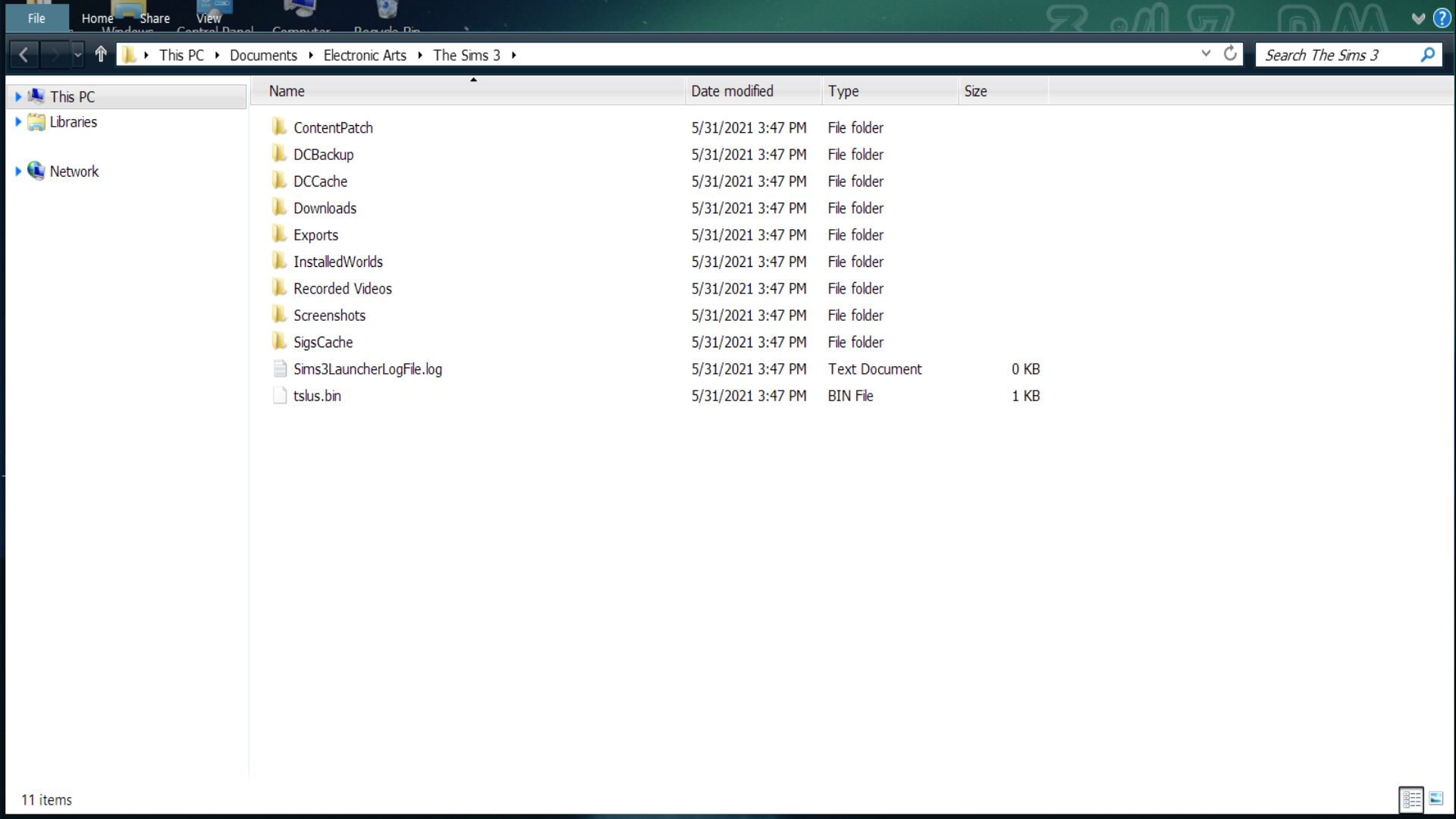
Yours doesn't look like this?
Yes, I was talking about the patch downloader mod.
Post by: Lapaige46 on May 31, 2021, 03:58:35 PM
"In general, most modifications in The Sims 4 will be delivered as .package files.
To import these modifications, highlight (use your cursor to draw a box around) the .package files in the folder and then right-click on them and select "Copy". Now you'll need to navigate to your Sims 4 Mods folder.
To do this, go to Documents > Electronic Arts > The Sims 4 > Mods.Once you're in that folder, simply right-click anywhere and then select "Paste." You'll then see the .package files you've downloaded appear!
When you start up your game, the mod or CC you've installed should be there and working perfectly!
You can watch video tutorial at:
https://www.youtube.com/watch?v=dqM0M2T9A_Y"
Post by: Lapaige46 on May 31, 2021, 04:02:49 PM
(https://i.ibb.co/d5ryxPX/sims-file.jpg) (https://ibb.co/d5ryxPX)
The Mods file I just put back.
And I apologize. I feel like I'm monopolizing your time with this.
Post by: MrsFlynn on May 31, 2021, 04:05:08 PM
I just looked in Documents\Electronic Arts\The Sims 3\Collections\User and saw a bunch of files as well. None of which I put there. So I'm assuming they are there by default. Meaning they get added when the user folder gets created.
Post by: Lapaige46 on May 31, 2021, 04:06:24 PM
Post by: MrsFlynn on May 31, 2021, 04:08:04 PM
As some of those folders/files don't get generated until you start a save file.
Oh no problem. I'm happy to help or at least try to help. :)
Post by: MrsFlynn on May 31, 2021, 04:10:41 PM
https://sims.fandom.com/wiki/Game_guide:Getting_store_content_to_work_with_the_Steam_version_of_The_Sims_3
Hopefully it will help!! :)
Post by: Lapaige46 on May 31, 2021, 04:11:59 PM
Yep that looks to be correct. Though it looks like you may have started a game first to get it to add some of those folders. lol
As some of those folders/files don't get generated until you start a save file.
Oh no problem. I'm happy to help or at least try to help. :)
I did, actually, when I tried to download RV. I then uninstalled it.
Thank you. I know you're trying. It's just a complete baffle! And I don't WANT to play it on my old computer. ::: stamping feet :::
Post by: Lapaige46 on May 31, 2021, 04:13:08 PM
MrsGoodWrench just shared this link with me, so I thought I'd pass it along:
https://sims.fandom.com/wiki/Game_guide:Getting_store_content_to_work_with_the_Steam_version_of_The_Sims_3
Hopefully it will help!! :)
Well, thanks for trying (and thank you MrsGoodwrench) . I use Chrome and here's what it says about that.
"Google Chrome automatically finds "Sims3Launcher" from the Steam directory after initiating the download process via The Sims 3 Store - you don't need to do anything else on your part."
Post by: MrsFlynn on May 31, 2021, 04:17:34 PM
The part that isn't working right is installing and staying installed.
Well, thanks for trying (and thank you MrsGoodwrench) . I use Chrome and here's what it says about that.
"Google Chrome automatically finds "Sims3Launcher" from the Steam directory after initiating the download process via The Sims 3 Store - you don't need to do anything else on your part."
Post by: MrsFlynn on May 31, 2021, 04:19:30 PM
I did, actually, when I tried to download RV. I then uninstalled it.
Thank you. I know you're trying. It's just a complete baffle! And I don't WANT to play it on my old computer. ::: stamping feet :::
Post by: Lapaige46 on May 31, 2021, 04:35:04 PM
Post by: MrsFlynn on May 31, 2021, 04:38:01 PM
Post by: Lapaige46 on May 31, 2021, 04:42:58 PM
I don't think the problem is necessarily with Steam either since the games on my old computer are the same games from Steam.
Post by: Lapaige46 on May 31, 2021, 04:43:27 PM
Post by: MrsFlynn on May 31, 2021, 04:49:39 PM
I'm still chewing on this. :)
Have fun playing Solitaire. That's a fun game!!
Post by: Lapaige46 on May 31, 2021, 04:56:31 PM
Post by: MrsFlynn on May 31, 2021, 05:40:26 PM
It's been suggested to use a different browser to download store content having problems downloading or keeping store content installed.
I remember awhile back having problems keeping store content installed. So I tried downloading it with a different browser and for whatever reason it was able to stay installed.
I'm not sure why though. It has always baffled me why downloading store content with a different browser made a difference.
Post by: Lapaige46 on May 31, 2021, 06:34:27 PM
Anyway, I'm going to go and make supper now so I'll try it later. I'll load in some of my saves and see what happens. Then I'll d/l UC and see what happens with that. Last time it seemed I could have one or the other but not both.
Post by: MrsFlynn on May 31, 2021, 06:40:45 PM
You're not able to keep both Riverview and Union Cove installed?
Post by: MrsFlynn on May 31, 2021, 06:52:57 PM
- Right-click on the Sims 3 icon and select Run as Administrator.
Wanted to share this link as well as it's got some great troubleshooting info in it. :)
Toubleshooting for The Sims 3
https://steamcommunity.com/sharedfiles/filedetails/?id=279488894
Post by: Lapaige46 on May 31, 2021, 07:35:23 PM
Post by: MrsFlynn on May 31, 2021, 07:58:19 PM
Post by: MrsFlynn on May 31, 2021, 08:29:10 PM
The reason I ask is because there are different versions of Windows 10 that more or less features.
Which version of Windows operating system am I running?
https://support.microsoft.com/en-us/windows/which-version-of-windows-operating-system-am-i-running-628bec99-476a-2c13-5296-9dd081cdd808
Post by: Lapaige46 on May 31, 2021, 09:23:30 PM
Post by: MrsFlynn on May 31, 2021, 09:32:51 PM
Post by: Lapaige46 on May 31, 2021, 09:34:07 PM
Post by: MrsFlynn on May 31, 2021, 09:35:52 PM
Doesn't work?
Post by: Lapaige46 on May 31, 2021, 09:39:58 PM
Post by: MrsFlynn on May 31, 2021, 09:45:30 PM
I got the wrong path. Right-click on the Sims 3 shortcut > Properties > Compatibility tab and check the box that says Run as Administrator.
Post by: MrsFlynn on May 31, 2021, 09:51:29 PM
Go into Steam Find Sims 3 In Steam - Right click on game and go to Manage and inside there click browse local files. That should take you to your install directory. From there go into the game folder then go into the bin folder - Find TS3.exe right click on that and select properties.
You should be able to find the compatibility tab from there.
Post by: Lapaige46 on May 31, 2021, 10:01:00 PM
I just launched the game and RV is still there including a couple of my saves. The real test will be when I turn it on tomorrow. It seems just downloading it through Edge was the answer.
Post by: Lapaige46 on May 31, 2021, 10:03:17 PM
Post by: MrsFlynn on May 31, 2021, 10:07:47 PM
Post by: Lapaige46 on May 31, 2021, 10:09:13 PM
Post by: MrsFlynn on May 31, 2021, 10:12:21 PM
Goodnight. :)
Post by: Lapaige46 on June 01, 2021, 07:54:02 AM
Post by: MrsFlynn on June 01, 2021, 08:07:16 AM
Post by: Lapaige46 on June 01, 2021, 09:14:04 AM
Post by: MrsFlynn on August 01, 2021, 12:46:11 AM
It's not only Steam and Origin players mentioning this, on a rare occassion I've read players with the disc version report disappearing store and custom content.
I haven't had any issues with disappearing content in quite some time, but still wanted to offer a suggestion of something that might help. -- Thinking of the disappearing content being due to Sims 3 not being white listed in your antivirus software.
Here's the troubleshooting steps:
-- Using a new Sims 3 folder.
Rename your current Sims 3 folder, so game can create new one when game is launched.
1. Disable the the antivirus software.
2. Install Riverview
3. Play Sims 3 in that open and close it a few times to see what stays installed.
If RV stays installed then it might be that Sims 3 may need to be white listed on your antivirus software. If you're not sure how, you may need to Google how to do that. As each antivirus software seems to have it's own way of doing things.
✽ If the above doesn't help you might try these tips from this (https://jadekitten.net/mfhot/index.php?topic=58.msg3124#msg3124) post.