Updated: Apr. 2023I am sharing my mods folder with some folders setup. I basically emptied out my current mods folder to share. lol Download
here from SimFileShare.net (Add your own mods and custom content files.)
In the Mods folder there is an Overrides folder that contains the ContentPatch.package and ccmerged.package to help get store content to work properly.
In Packages you'll find the following folders. All of them are empty.
No mods or custom content added, except NoBuildSparkles.package and nointro.package. You can find them in: The Sims 3\Mods\Packages\MTS
I did add sub-folders in each of the main folders listed to help organize. You can rename them by clicking on the folder and select rename.
–Blams - Add Store .package files to this folder.
–CC - Add other custom content .package files
–ModtheSims - is mods from that site.
–Nraas - mods from that site.
–TFM - Files from SimsAsylum.
Though I did add sub-folders in each of the main folders listed to help organize. You can rename them by clicking on the folder and select rename.
Click to see larger view: (old image, but still gets the idea)
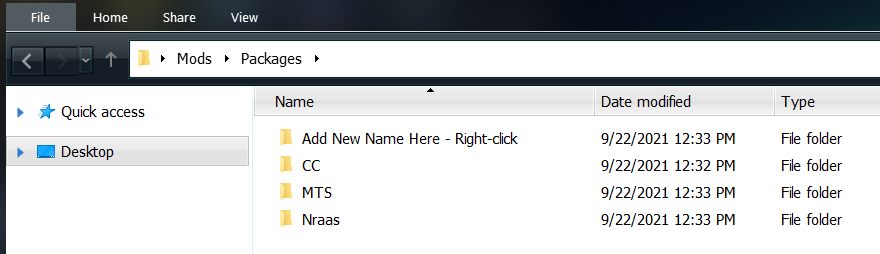
Feel free to add files to these folders or delete them. You can also add your own sub-folders to the folders I've made to better organize your mods and custom content.

-- To create a folder, right click in the mods folder > Select New Folder and give it a name.
Please don't forget to back up your current mods folder to your desktop temporarily. I don't want you loosing any of your files.
~ How-to download and save the file:Click on the file link to Save. If the browser you're using doesn't allow you to download because it's telling you that Simfileshare is unsecured, please try another browser or check your browser's security settings. For reference, I use Firefox. Read more
here about the SimFileShare Security Warning.
It's suggested to save to desktop for temporary and then later can be deleted or moved to backup drive.
~ How-to extract the file:Extract the file with 7-Zip -
https://www.7-zip.org/Right-click File ➺ 7-zip ➺ Extract to Mods
– This extracts everything into a folder with the name of Mods.
Open the folder it gives you and copy the mods folder into your Sims 3 folder.
\Documents\Electronic Arts\The Sims 3
~ Alternative methods:Open File Explorer and find the zipped folder.
To unzip the entire folder, right-click to select Extract All, and then follow the instructions.
To unzip a single file or folder, double-click the zipped folder to open it. Then, drag or copy the item from the zipped folder to a new location.
See more information
here - Zip and unzip files

