Author Topic: Lyralei's CC Sewing Machine ~ Help Thread  (Read 19043 times)

Sonshine

  • Tourist
  • ***
  • Posts: 289
Lyralei's CC Sewing Machine ~ Help Thread
« on: February 04, 2021, 02:09:01 PM »
I don't know where to post this, but I found a glitch w/Lyralei's Sewing Machine mod. It loads up w/an error msg when I travel, and it prevent my sims from smelting metals in the smelter furnace in the Prism Art Studio. When I had my sim doing that, she would start and then stop as soon as she would try to put in the furnace. I took out that mod and the buyable store objects mods and loaded the game and she was able to do it. I narrowed it down to Lyralei's Sewing Machine though. : /  Other than that, as far as I know, it works great! Just another mod where you have to kind of shuffle.

MrsFlynn

  • Forum Goddess
  • Administrator
  • Ultimate Townie
  • *****
  • Posts: 2902
  • Come to the dark side... We've got cookies 🍪🍪 ☕
Lyralei's CC Sewing Machine ~ Links to Downloads and Installation Info.
« Reply #1 on: February 04, 2021, 02:42:47 PM »
✽ Updated: Feb. 2024, added info below in 2026 ✽

  ~ Links to Downloads and Installation Information:

TS3 Functional Sewing Table
Information: https://modthesims.info/d/643837
Direct Download Link: https://chii.modthesims.info/getfile.php?file=2010023&v=1692262047

Sewables - Skirt and Tops
Information: https://modthesims.info/d/654937
Direct Download Link for Skirts:
https://chii.modthesims.info/getfile.php?file=2004916&v=1618347130
Direct Download Link for Tops:
https://chii.modthesims.info/getfile.php?file=2004917&v=1618347132

    ----

–- To unzip a file/folder, double-click the zipped folder to open it.

Unzip the files to to a new folder of the same name (Lyralei) on your desktop.

Then, copy the folder (Lyralei) from your desktop to the mods\package folder:
[C:\Users\Username\Documents\Electronic Arts\The Sims 3\Mods\Packages\]

Sewing Machine can be found in Buy Mode > Entertainment > Hobbies and Skills > Lyralei's Sewing Table = §1,250. -- Click on images to see larger view.


  ~ Note About the Sewing Machine:

–- It's suggested to remove the sewing machine from the mods\package folder when no longer playing with it.
[C:\Users\Username\Documents\Electronic Arts\The Sims 3\Mods\Packages]

++ Be sure to remove it from any houses and community lots you may have added it to along with any patterns your Sims may have. This will help prevent issues with your save files and Sims.

I've had patterns become corrupt when the sewing machine glitched and glitch the house(s) the machine was in. This is why I'm adding this note.

You can manually remove the sewing machine in-game by deleting the object out of the houses and community lots and patterns from individual inventories and any storage.

Or you can use Nraas Master Controller: [https://www.nraas.net/community/MasterController] to help clean up.

With an active Sim, click on lot > Nraas MasterController > Object Stats > Not in Inventory
Select Unwanted objects to delete. Once chosen you can delete them individually or all at once.

Once cleaned up use Save As and save with new name.


  ✦ Added: April 2026

If you're like me, you like to get an idea of what patterns you are trying to sew before jumping into sewing. I took screenshots of all the patterns that can be purchased for the While I was testing Lyralei's Sewing machine in 2023. I have found these very handy and wanted to share. :)

The zipped file is attached to the bottom of the post or you can download it directly -  here.

MrsFlynn

  • Forum Goddess
  • Administrator
  • Ultimate Townie
  • *****
  • Posts: 2902
  • Come to the dark side... We've got cookies 🍪🍪 ☕
Lyralei's CC Sewing Machine ~ Notes
« Reply #2 on: February 04, 2021, 03:13:34 PM »
✽ Updated: Feb. 2024

I wanted to share some notes I took awhile back when I was doing some testing with the sewing machine, first round of testing in 2021. At that time, I only had base game installed. So I only noted what patterns are available with base game installed.


~ Sewing Machine:

Buy mode > Sort By Function > Entertainment > Lyralei's Sewing Table = §1,250. -- Click on images to see larger view.
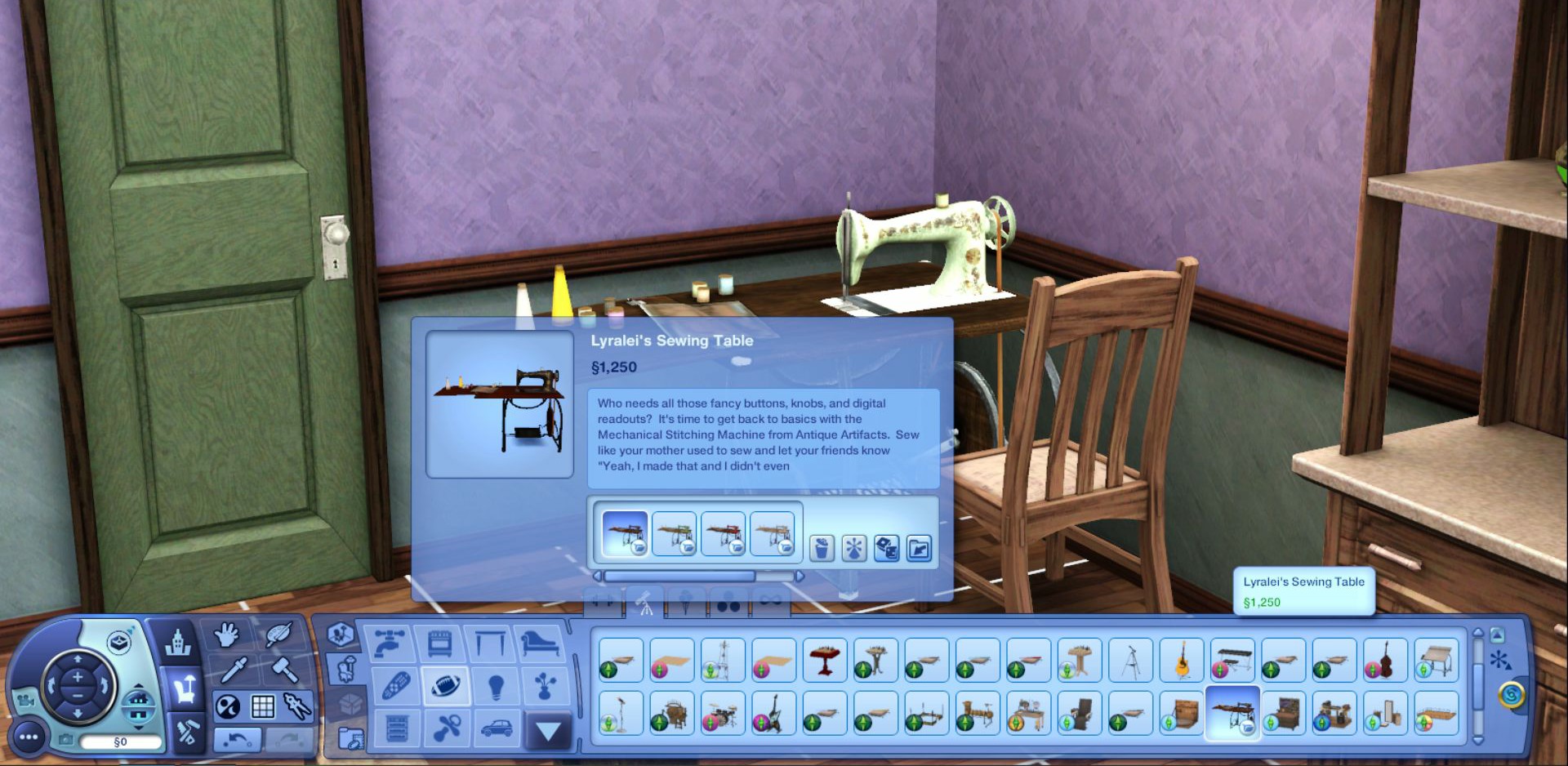


Sewing machine options are: (After level 1 of Sewing Skill)

–- Start Project. You need to have at least one pattern in your Sim's inventory to start a project. (Yes MrsFlynn, I'm looking at you!! *Smile*)
–- Practice Sewing
–- Open Sewing Table's Inventory
–- Restock Fabric -- [5pc = §50. ; 10pc = §100. ; 100pc §1000.]

  ----

~ Skilling Information:

After Level #1 - Buy any pattern, even clothing patterns, if installed. (Any and All patterns become unlocked to purchase for §200. each. via the computer.)

Level #3 - Blog about Sewing and Browse for Patterns.

Level #6 - Sew Clothes.

Patterns are the 'guideline' for a sim to sew an object. There are 4 different levels:

Level 0 To 2: Easy sewable projects
Level 3 to 5: Medium sewable projects
Level 6 to 8: Hard sewable projects
Level 9 to 10: Super hard sewable projects
(Special - being a supernatural sim) Level 9 to 10: Super hard sewable that require a bit of magic - your sim needs to be either a Witch, Fairy, Genie or an imaginary friend in order to unlock these.

  ✽ It is not noted what the easy/med/hard projects are on the mod's page and I have not been able to figure what patterns are what level.  Each time I test, my sewing Sim gets different patterns to start.

   ----

~ Discovering and Buying Patterns: (Any Sim in the household can learn all patterns by)

 –- Practice Sewing on the Sewing Machine.
 –- Reading the Sewing Skill Books, available at the bookstore.
 –- Browsing for Patterns on the Computer.
 –- Buy Patterns via the Computer.
 –- Through the Pattern Club via Mail.

    ✽ Reading Sewing Skill books helps skill up faster than using the machine. However, less patterns may be discovered this way.

All patterns can be purchased via computer, discovered via practice sewing or reading sewing skill books.

You can get the patterns via Nraas DebugEnabler.
Click on Sewing Table > Nraas > DebugEnabler > Options: Sewing Table - Debug_GetAllPatterns

This will add the whole pattern collection to your Sim's personal inventory.

  ----

~ Join Pattern Club:

Your Sim can signup for the Pattern Club after sewing skill level 1, using the computer.

If reading the sewing skill books to skill up, you only need to read a little bit of the 1st book before you get the option to signup to the pattern club.

It's by design that your sewing Sims cannot join pattern club until they have a sewing table placed on the lot and a sewing level of 1. Afterwards - Click Computer > More to find the options. This is when you'll also get Start project. So practice sewing till you get better. lol

Depending on what packs you have installed, you may need to select the More option on the computer to find the Join Pattern Club and Buy Patterns options.

If these options aren't showing up on your computer, you may need to reset the computer, lot or replace computer. The options not showing could happen if your family has a computer on the lot before purchasing the sewing machine.

A pattern by mail should arrive a little after 8am on Thurs. mornings.

   ----

~ Sewing Books:

Sewing for Beginners:
"Trrrr Noises and What to do When Running Out of Fabric." = §50.

Sewing for the Not-Too-Pros:
"Help! My Sewing Machine Ate My Fabric!" = §500.

Sewing For the Actual Pros:
"How to Train Your Patterns to Sew for Themselves... For Real. = §750.

  ----

~ Using Patterns:
Any Sims in the household can use the patterns as long as they have the desired one in their personal inventory and the sewing skill level for the pattern.

~ Pattern Storage:
Patterns can be stored in a bookshelf, WA chest, sewing table and any custom content storage. Possibly other places as well. -- When you need to use one it needs to be placed back into your Sims' personal inventory.

~ Deleting Duplicates:
Yes, you can delete duplicates. It won't harm anything. If you find that you delete a pattern by mistake it can be purchased again via the computer, or just keep practicing sewing to discover it again.

  ----

~ Misc. Tips:

 –- All finished sewables (clothes, rugs etc.) can be recolored via Create a Style.

 –- Finished clothing items show up via the dresser > Plan Outfit if not hidden. If hidden, check for a file called Lyralei_SewablesSewingTableEnabled.package and remove it. That will allow clothing to show up.

 –- To sew anything, the specific pattern needs to be in your Sim's personal inventory. It cannot be in the bookshelf/chest or family inventory.

 –- Takes about 5 to 6 hours (give or take) in-game to sew a pattern.

 –- The higher your sewing skill level the more patterns you discover.

 –- Without University installed, for example, there is no patterns from that pack.

 –- NPC Sims will use the sewing machine, but not be able to gain skill or create anything.

   ----

~ Pattern List for Base Game:  (12 Rug Patterns)

No expansions or stuff packs required to have a functioning sewing machine. Though with having different packs enabled/installed there is a better pattern selection than just the 12 base game rugs. lol

 –- Dated Faded Floral Rug
 –- Chandelier Rug
 –- Rocket Rug from Randy Homson
 –- Marathon Carpet Runner
 –- L7 Rug
 –- The Saxony
 –- Flying Carpet
 –- Purrfect Rug
 –- Aristocratic First Oval Rug
 –- Modern Oval Rug
 –- Welcome Matt
 –- Poor Man's Half-Round Rug

   ----

~ Troubleshooting Tips:

–- Success/Fail Rating:

The chance of failure per project has been fixed, at least somewhat. However, I wanted to share some further tips in case there are issues for you.

If a project or projects fails continuously, say more than 3 out of 4 times for example.

- Sell the machine and all patterns. Buy a new machine, buy or find new patterns to try.

- Try deleting the mod, clear the cache files, download and install a fresh copy of the mod to try a project or two.

–- Sim Teleports or Resets Outside the Front Door:

This seems to be a glitch from a failed project or glitched pattern left in the Sim's personal inventory.

When this happens I usually sell/delete both the sewing machine and all the patterns my Sim has collected and start over again as a way of resetting the machine and patterns.

–- Continue Project Bug:

I've also experienced this bug. There's a couple of things I've done  that seemed to helped.

- Exit game and removed the sewing table mod and sewable clothes if installed. Cleared the cache files and reinstalled the mod and sewable clothes.

–- Failed To Load Sewing Skill error:

Remove the sewing machine, any patterns you have in your Sim's inventory and remove the sewing skill via Nraas Master Controller to help clean/reset the Sim and their house of the glitched machine/patterns.

Also remove the file from the mods\package folder:
[C:\Users\Username\Documents\Electronic Arts\The Sims 3\Mods\Packages]

Download and install a fresh copy of the mod.

To reset the sewing skill: Click on Active Sim > Nraas > MasterController > Advanced > Skill Level > Sewing and change it to zero.

Once cleaned up use Save As and save with new name.

   ----

  ++ There are a couple more mods that help with the sewing machine.

-- Use the Nraas Retuner Mod (https://www.nraas.net/community/Retuner) to better your success chances.

City Hall/Computer > Nraas > Retuner > Settings > General > By Tunable XML > Sims3.Gameplay.Objects.Lyralei > SewingTable > SuccessChance (or SuccessIncreasePerLevel)

I was able to have my sewing Sim do 4 successful projects out of the 4 started after setting up Retuner.

-- Nraas DebugEnabler (https://www.nraas.net/community/DebugEnabler) to help get all the patterns.

You can get the patterns via Nraas DebugEnabler.
Click on Sewing Table > Nraas > DebugEnabler > Options: Sewing Table - Debug_GetAllPatterns

This will add the whole pattern collection to your Sim's personal inventory.

Lapaige46

  • Ultimate Townie
  • *****
  • Posts: 2560
  • I let my mind wander and it hasn't come back.
Re: Lyralei's CC Sewing Machine ~ Help Thread
« Reply #3 on: February 04, 2021, 03:18:08 PM »
I think I have the most recent version of that but I also get the error message on loading. I haven't actually played the sim recently that uses it so I don't really know what impact it has. I've been too busy building to let my sims get on with their lives. I need to be triplets or even quads to do everything I want to in this silly game. :D

MrsFlynn

  • Forum Goddess
  • Administrator
  • Ultimate Townie
  • *****
  • Posts: 2902
  • Come to the dark side... We've got cookies 🍪🍪 ☕
Re: Lyralei's CC Sewing Machine ~ Help Thread
« Reply #4 on: February 04, 2021, 03:40:33 PM »
This is the error message I'd get, but only if I loaded certain save files, if I remember correctly.


From what I understand this message isn't suppose to be showing all the time on all save files, and especially when creating new save files. However I do know that if you remove the sewing machine and delete the cache files the message goes away without affecting your save files.

-- Though you may get the some objects were removed message. That is completely normal and is fine in this instant as you had just removed the sewing machine.

Here's a quote from Lyralei about the screenshot error message above.

Quote
Quote from Lyralei = Msg #141 - Link Here
I've personally noticed that there are these super rare cases that it might popup. And that's seemingly also with saves that are so old, they weren't originally saved with the 1.67/1.69 patch. But it also happens with saves that either already has issues saving and loading those up are already half corrupted I'd say? Or even using the save cleaner program. Although for that program, even that is so rare that it happens. it's quite hard to pinpoint what exactly in those save files is the thing that screws it up and what checks need to be put in the code to prevent it from happening.

However, I do want to say that if it ever comes up in those rare occasions, it doesn't hurt the mod (or game)per se. It just means that the list with patterns that the sewing table collects already exists in the game, and therefore it didn't want to duplicate those items  (Sorry if that was a bit too technical there :p I actually have no idea how to explain it any less technical)

Lapaige46

  • Ultimate Townie
  • *****
  • Posts: 2560
  • I let my mind wander and it hasn't come back.
Re: Lyralei's CC Sewing Machine ~ Help Thread
« Reply #5 on: February 04, 2021, 03:52:34 PM »
That's exactly what I get.

MrsFlynn

  • Forum Goddess
  • Administrator
  • Ultimate Townie
  • *****
  • Posts: 2902
  • Come to the dark side... We've got cookies 🍪🍪 ☕
Re: Lyralei's CC Sewing Machine ~ Help Thread
« Reply #6 on: February 04, 2021, 04:06:55 PM »
Ah okay, Thanks for letting me know.  Hopefully you're not getting that message on all your save files?

Lapaige46

  • Ultimate Townie
  • *****
  • Posts: 2560
  • I let my mind wander and it hasn't come back.
Re: Lyralei's CC Sewing Machine ~ Help Thread
« Reply #7 on: February 04, 2021, 04:30:09 PM »
I hadn't noticed until now. I loaded up a save to copy the B&B then opened a new game to edit it. The error message didn't show up on the save but it did on the new game.

MrsFlynn

  • Forum Goddess
  • Administrator
  • Ultimate Townie
  • *****
  • Posts: 2902
  • Come to the dark side... We've got cookies 🍪🍪 ☕
Re: Lyralei's CC Sewing Machine ~ Help Thread
« Reply #8 on: February 04, 2021, 04:39:39 PM »
It's definitely not suppose to be giving you that message every time you start a new game. At least I don't think it is. That may be something that needs to be asked over at MTS.

Lapaige46

  • Ultimate Townie
  • *****
  • Posts: 2560
  • I let my mind wander and it hasn't come back.
Re: Lyralei's CC Sewing Machine ~ Help Thread
« Reply #9 on: February 04, 2021, 04:42:53 PM »
It's definitely not suppose to be giving you that message every time you start a new game. At least I don't think it is. That may be something that needs to be asked over at MTS.

I haven't concerned myself with it because I'm not playing any actual sims at the moment, but I will investigate further when I get back into that.