I save both my lots and families to the library and rename the files. This is how I do it.
1. Save your lots and families like you normally would - to the in-game library. See howtos linked below if you need help with that.
How To: Save Lots to LibraryHow To: Save Families to Library2. Look at a clock to make note of the date and time, this is important if there's a ton of files in the library folder. It helps find the files you just saved and want to rename.
3. Go to the Sims 3\Library folder - \Documents\Electronic Arts\The Sims 3\Library
Click on Date modified, to bring newest saved files to top of list. Look for the files that has the closest time to when you saved the lot or family.
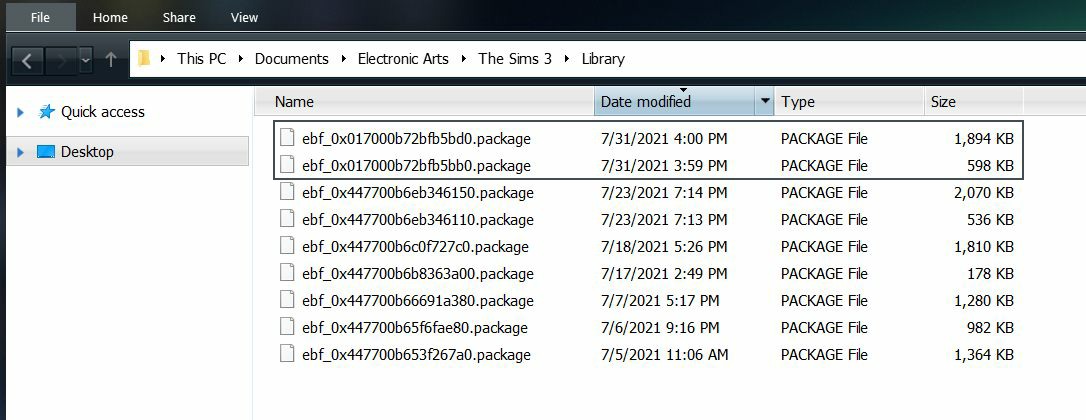
Note: Looking at the size tab, the house is the larger sized file. (1894 KB) and the family is the smaller sized file (598 kb)
To Rename the file:
Right-click on file and select Rename.
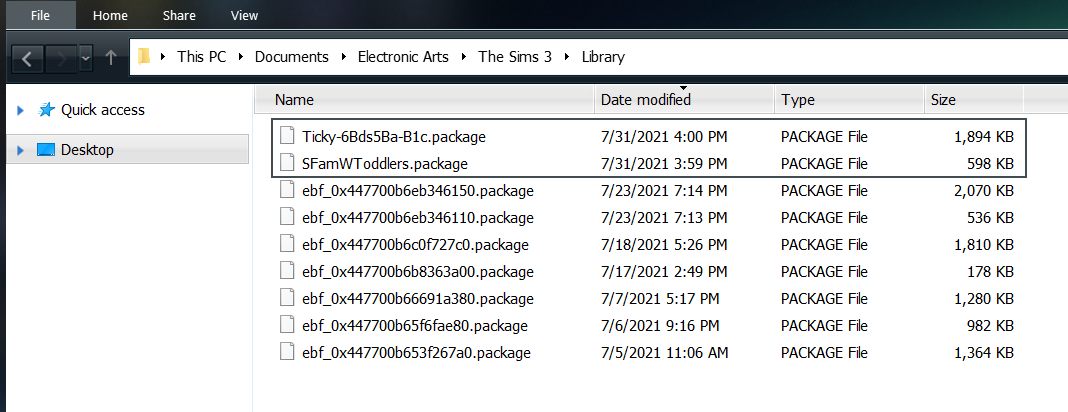
Add the files to a folder, give it a name, zip it up and it's ready to share.

It's suggested to copy the .package file(s) to a folder and zip it up for easier download and less problems as some have problems downloading raw .package files.
How to Make a Zip File - From Wikihow
This is an alternative way to share files without having to use the .Sims3Pack files that are in the Exports folder and bypass the Sims 3 launcher!!
----
I know, now you're asking... well that's a great how-to, but how do I tell what the other files are in the Library folder?
I look at them via s3pe and you can too. Learn how
here!!

