Author Topic: The Flea Circus ~ A thread for tips, tricks and ideas  (Read 39592 times)

MrsFlynn

  • Forum Goddess
  • Administrator
  • Ultimate Townie
  • *****
  • Posts: 2902
  • Come to the dark side... We've got cookies 🍪🍪 ☕
Jumping Down a Custom Rabbithole ~
« Reply #10 on: February 02, 2021, 07:29:13 PM »
Links and information on how to create your own custom rabbithole!! Thanks to Mrs GoodWrench for helping me find this info and putting together the list. :)

Sims 3 - How To Make A Custom Rabbit Hole
https://www.youtube.com/watch?v=Jg69hhMRc_E
- Build a basement add a rabbithole in. Add stairs to basement so Sims can go in/out of rabbithole.

I've read about the above tip before. Never tried it, but tried it as a test and thought to share it here

Tutorial: Design your own rabbit holes (on small lots) without downloads
http://simension.de/sims-3-english-tutorials/sims-3-tutorial-design-rabbit-holes-small-lots-without-downloads/

Making Unique Rabbitholes
https://cawtool.fandom.com/wiki/Making_Unique_Rabbitholes

Building Tips
https://www.nraas.net/community/Building

Rabbithole Doors ~
https://modthesims.info/d/435107

Rabbithole Rugs ~
https://modthesims.info/d/411270

More Tid-Bits: Rabbit holes are objects, so no you cannot turn them into buildings unless you build your own version of the rabbithole buildings.

If you put a register on a lot, the vanilla game will assign someone to work there.  There are a couple/few mods that allow you to operate your own business and hire workers or have a custom job or career.

Custom Generic Role
https://modthesims.info/d/559243

Zerbu's Ultimate Careers
https://modthesims.info/d/657354/

MissyHissy's Job Centre
https://missyhissysjobcentre.wordpress.com/

If you've created a custom community lot like the grocery store, diner, bistro, salon etc. you will need to place a rabbithole rug in those lots to make them functional.

The game will assign jobs to Sims when you first start playing a new saved game, regardless if you set them up with this or that career or job.  Specially if the game has any NPC jobs or careers added to it that need to be filled.

I think it's after the game has filled all it's jobs that you can then pick jobs for your actively played Sim.

Nindigo

  • Forum Nutcase
  • Ultimate Townie
  • *****
  • Posts: 1378
  • Have some tea☕ and dark side cookies🍪
    • Nindigo's Sims
Change Color or Intensity of a Light
« Reply #11 on: February 14, 2021, 02:27:09 AM »
So, I have now learned how to make brighter indoor lights thanks to this video by James Turner.

In Build or Buy mode, hold CTRL+Shift while clicking on a light source and a pie menu will appear. Using the customize option and setting the value to 5 adds a whole lot of wonderful light to a room.

Click image to see larger view

Avatar from HERE
Awesome emojis: emojipedia.org

(When I am AWOL sometimes, it is either because I play other games and/or have pain issues)

Nindigo

  • Forum Nutcase
  • Ultimate Townie
  • *****
  • Posts: 1378
  • Have some tea☕ and dark side cookies🍪
    • Nindigo's Sims
Pam's List of Hex Codes for Favorite Colors
« Reply #12 on: February 26, 2021, 12:22:01 PM »
Pam's List of Hex Codes for Favorite Colors:

https://www.carls-sims-4-guide.com/forum/index.php?topic=1433.0
Avatar from HERE
Awesome emojis: emojipedia.org

(When I am AWOL sometimes, it is either because I play other games and/or have pain issues)

Nindigo

  • Forum Nutcase
  • Ultimate Townie
  • *****
  • Posts: 1378
  • Have some tea☕ and dark side cookies🍪
    • Nindigo's Sims
Extensive Wiki list of hex colors:
« Reply #13 on: March 12, 2021, 12:07:46 AM »
Extensive Wiki list of colors:

A-F
G-M
N-Z
Avatar from HERE
Awesome emojis: emojipedia.org

(When I am AWOL sometimes, it is either because I play other games and/or have pain issues)

MrsFlynn

  • Forum Goddess
  • Administrator
  • Ultimate Townie
  • *****
  • Posts: 2902
  • Come to the dark side... We've got cookies 🍪🍪 ☕
How To Get Snow Photos
« Reply #14 on: March 12, 2021, 11:59:43 AM »
1. Load an active household.
2. Turn on testingcheatsenabled on
-- Press Ctrl-Shift-C together and type in testingcheatsenabled on.

3. Click on ground, select Season (Winter).


4. Select Snow Level (deep).


5. Change weather to (snow and varying).


MrsFlynn

  • Forum Goddess
  • Administrator
  • Ultimate Townie
  • *****
  • Posts: 2902
  • Come to the dark side... We've got cookies 🍪🍪 ☕
Owned Business Closed - Tip
« Reply #15 on: March 15, 2021, 10:57:28 AM »
I was racking my brains over this.. I searched it out, cause placing more light fixtures wasn't fulfilling what the lot needed to be opened.

If you find any business that you own closed, it means it needs to have something upgraded to allowed to be opened. For example if your business says it needs bathroom fixtures, that means it may need a toilet, sink or shower. The All-in-One shower/toilet from IP does not count as a bathroom fixture.

I wanted to share this tip in case anyone else was wondering. This is the first time I've come across this issue. Though, this is one of the first times I've tried owning any community properties that allowed for upgrades too. lol

MrsFlynn

  • Forum Goddess
  • Administrator
  • Ultimate Townie
  • *****
  • Posts: 2902
  • Come to the dark side... We've got cookies 🍪🍪 ☕
Tip for Wall Hangings ~
« Reply #16 on: March 20, 2021, 05:47:07 PM »
Once a wall hanging is placed on the walls you can move it up and down with the mouse. Hold Alt for finer adjustment. If you have moveobjects on cheat you can overlap the wall hangings and make a gallery wall.

MrsFlynn

  • Forum Goddess
  • Administrator
  • Ultimate Townie
  • *****
  • Posts: 2902
  • Come to the dark side... We've got cookies 🍪🍪 ☕
Installing Store Towns and Tip!!
« Reply #17 on: May 09, 2021, 04:10:59 PM »
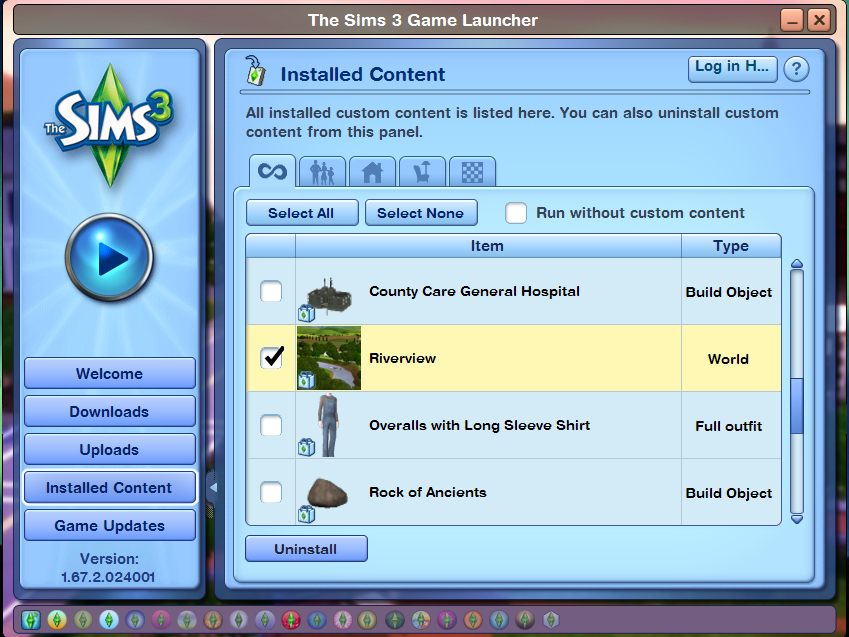
In this example, I'll be Installing Riverview. Tip: If trying to reinstall a Store Town, look in the InstalledWorlds folder for any duplicate town files and delete them. (Thank you LaPaige for the tip!!)

1. Copy Riverview File to Sims 3 Downloads folder:


2. Open Launcher - Check Downloads tab and Click Install.
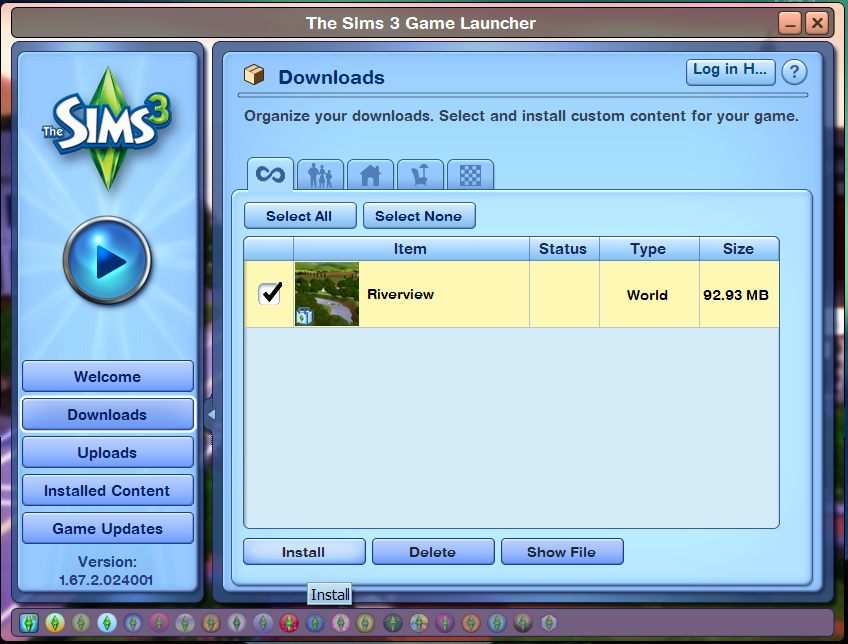

-- Riverview Installed!!


3. Check the Install Content tab to make sure Riverview was installed.

4. Load Sims 3 to see if Riverview is in the town drop down list.
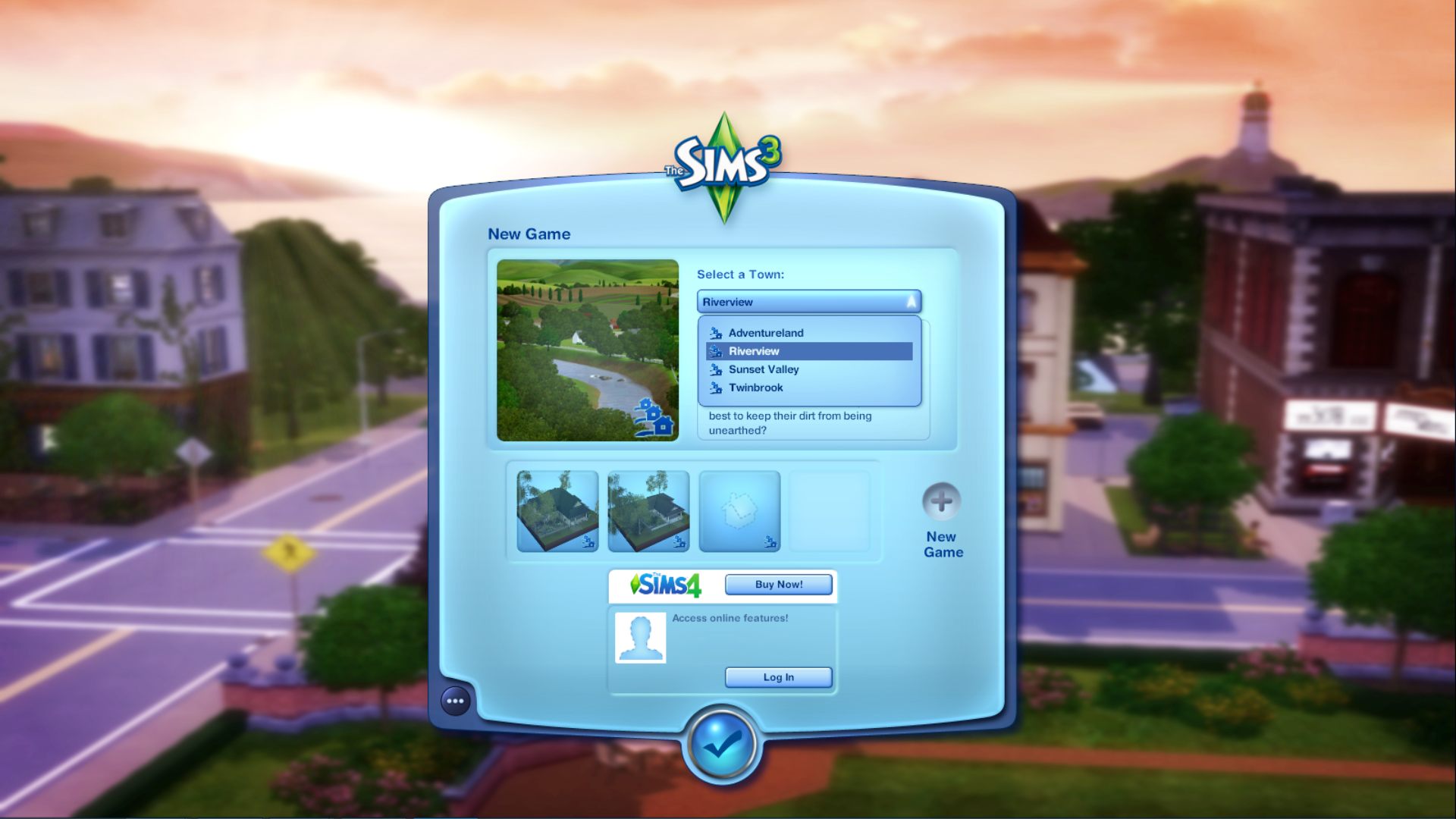

** If you see two Riverview listings Go to the InstalledWorlds folder
\Documents\Electronic Arts\The Sims 3\InstalledWorlds -- and delete any extra Riverview files there are.

Sonshine

  • Tourist
  • ***
  • Posts: 289
Adjust the number of servings for a group meal w/Retuner
« Reply #18 on: May 13, 2021, 07:25:32 PM »
Something I've been doing in retuner lately. When your household is just beginning and you only have 1 or 2 sims and can only afford the cheap fridge, you can adjust the number of servings for a group meal so that it doesn't spoil before you finish it which typically happens in the beginning. In my current household, I have the serving size set at 16 now b/c there are 7 sims in the household (there were 8, but one just passed) and that makes for about 2 servings each. In the beginning I set it at 4 for a single sim.

Just go to Retuner/Settings/General/Tuneable XML/

Sims3.Gameplay.Objects.CookingObjects/Food/kNumServingsForGroupMeal. From there, you can adjust the number for what ever you want. This way, you won't have to have food spoiling on you before you can get the super fridge.

Sonshine

  • Tourist
  • ***
  • Posts: 289
Beekeeping box Tips Using Retuner
« Reply #19 on: May 14, 2021, 08:57:02 PM »
I just looked and for my preference, I keep the number of members in the alien household at the default. I kind of like the aliens sometimes so I also upped the chance of visiting, but that is a personal choice. The rest of it is correct  to totally disable the abductions. I have mine set for visiting, but abductions are off.

On the Beekeeping box, you forgot to put in editing the bee attack and sting chances.

Beekeeping Box>BeeAttckBonusToBeeStingChance List> make all three 0.
Next line kBeeAttackChances - List and make all three 0.
Next line, kBeeAttackChanes - List and again make all three 0.

On the 11th line down from the top, you can also reduce the number of hours between harvesting the honey and also below that the amount of honey that can be stored.